Menu
ILINX Version
ILINX 9.7
ILINX Capture 9.7
ILINX Content Store 9.7
ILINX Engage
Other Products 9.7
ILINX Release Notes 9.7
ILINX Installation Guide 9.7
System Requirements
Support Matrix 9.7
ILINX Enhanced Security Options
ILINX 9.6
ILINX Capture 9.6
ILINX Content Store 9.6
ILINX eForms 9.6
ILINX Engage 9.6
ILINX Flex 9.6
Other Products 9.6
Supporting Documents
ILINX 9.6 Installation Guide
ILINX Release Notes 9.6
Support Matrix 9.6
ILINX Enhanced Security Options
ILINX 9.5
ILINX Admin Studio 9.5
ILINX Capture 9.5
ILINX Content Store 9.5
ILINX eForms 9.5
ILINX Engage 9.5
ILINX Flex 9.5
Other Products 9.5
Support Documents
ILINX 9.5 Installation Guide
ILINX Release Notes 9.5
Support Matrix 9.5
ILINX Enhanced Security Options
ILINX 9.1
ILINX Capture 9.1
ILINX Content Store 9.1
ILINX eForms 9.1
Other Products 9.1
Supporting Documents
ILINX 9.1 Installation Guide
ILINX Release Notes 9.1
Support Matrix 9.1
ILINX Enhanced Security Options
ILINX 9.0
ILINX eForms 9.0
ILINX Capture 9.0
ILINX Content Store 9.0
Other Products 9.0
Supporting Documents
ILINX 9.0 Installation Guide
ILINX 9.0 Release Notes
Support Matrix 9.0
ILINX Enhanced Security Options
ILINX 8.6
ILINX Capture 8.6
ILINX Content Store 8.6
ILINX eForms 8.6
Other Products 8.6
Supporting Documents
ILINX Installation Guide 8.6
ILINX 8.6 Release Notes
Support Matrix 8.6
ILINX Enhanced Security Options
Tools
Contact Support
IILNX Password Administrator
Capture Tab Options & Shortcuts
Data Type Modification
Document Display Context Menu Shortcuts
Legal
ImageSource Software Privacy Policy
ImageSource Software Terms of Use
EULA
ILINX Help Center Privacy Policy
Terms of Use
User Registration
Log In
ILINX Version
ILINX 9.7
ILINX Capture 9.7
ILINX Content Store 9.7
ILINX Engage
Other Products 9.7
ILINX Release Notes 9.7
ILINX Installation Guide 9.7
System Requirements
Support Matrix 9.7
ILINX Enhanced Security Options
ILINX 9.6
ILINX Capture 9.6
ILINX Content Store 9.6
ILINX eForms 9.6
ILINX Engage 9.6
ILINX Flex 9.6
Other Products 9.6
Supporting Documents
ILINX 9.6 Installation Guide
ILINX Release Notes 9.6
Support Matrix 9.6
ILINX Enhanced Security Options
ILINX 9.5
ILINX Admin Studio 9.5
ILINX Capture 9.5
ILINX Content Store 9.5
ILINX eForms 9.5
ILINX Engage 9.5
ILINX Flex 9.5
Other Products 9.5
Support Documents
ILINX 9.5 Installation Guide
ILINX Release Notes 9.5
Support Matrix 9.5
ILINX Enhanced Security Options
ILINX 9.1
ILINX Capture 9.1
ILINX Content Store 9.1
ILINX eForms 9.1
Other Products 9.1
Supporting Documents
ILINX 9.1 Installation Guide
ILINX Release Notes 9.1
Support Matrix 9.1
ILINX Enhanced Security Options
ILINX 9.0
ILINX eForms 9.0
ILINX Capture 9.0
ILINX Content Store 9.0
Other Products 9.0
Supporting Documents
ILINX 9.0 Installation Guide
ILINX 9.0 Release Notes
Support Matrix 9.0
ILINX Enhanced Security Options
ILINX 8.6
ILINX Capture 8.6
ILINX Content Store 8.6
ILINX eForms 8.6
Other Products 8.6
Supporting Documents
ILINX Installation Guide 8.6
ILINX 8.6 Release Notes
Support Matrix 8.6
ILINX Enhanced Security Options
Tools
Contact Support
IILNX Password Administrator
Capture Tab Options & Shortcuts
Data Type Modification
Document Display Context Menu Shortcuts
Legal
ImageSource Software Privacy Policy
ImageSource Software Terms of Use
EULA
ILINX Help Center Privacy Policy
Terms of Use
User Registration
Log In
Print
ILINX product documentation & current release information.
Help Guides
To locate general product guide information, use the search bar directly above or browse the categories below.
Intelligent Document Processing
Capture
eForms
Email Import
Import/Export
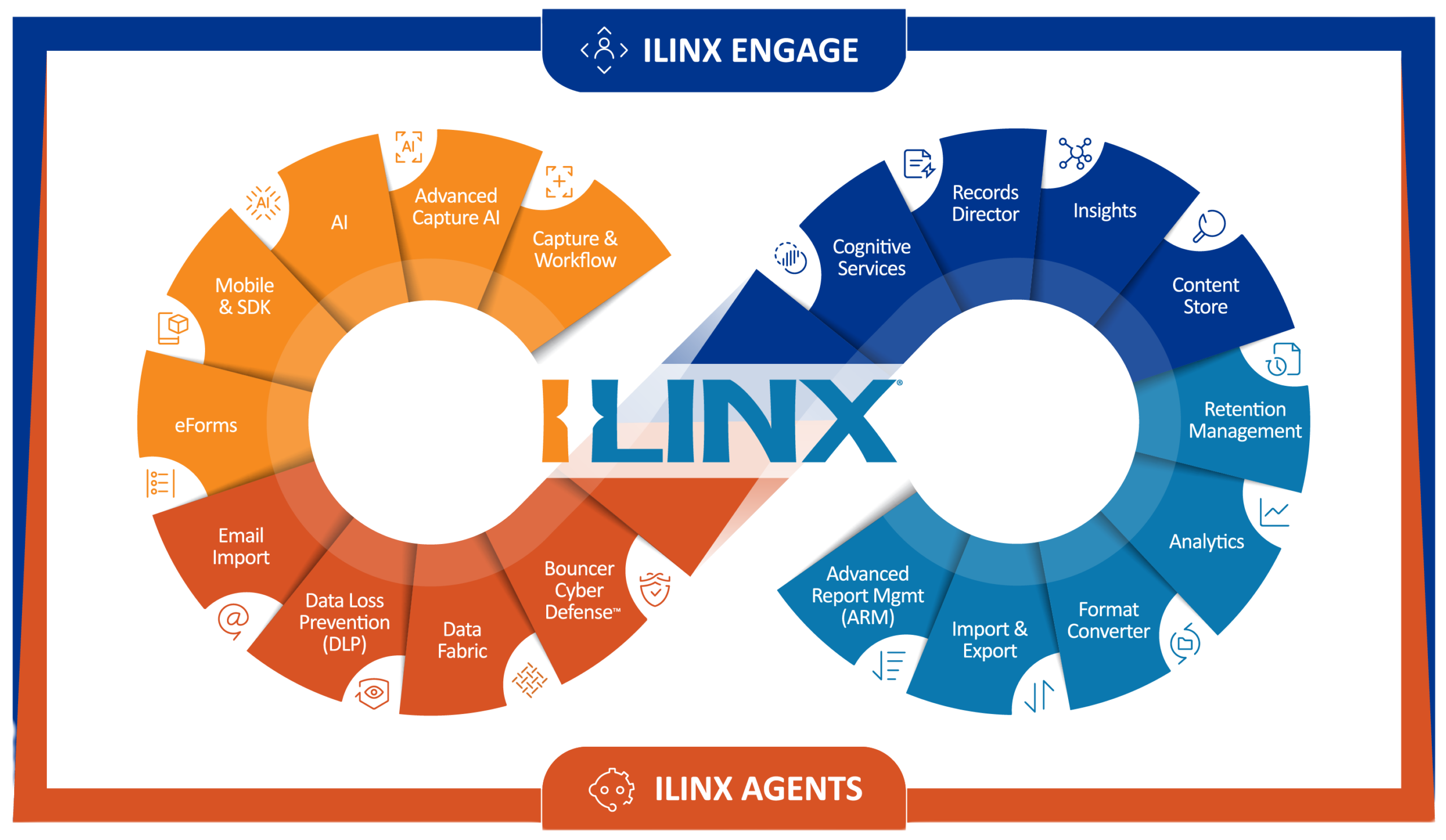
ILINX uses AI-powered content understanding to turn incoming information into accurate, decision-ready data while reducing errors, rekeying, and manual effort.
Help Guides
Data
Readiness
Content Store
Retention Manager
Advanced Report Manager (ARM)
ILINX makes information AI-ready with structure, governance, and secure access—delivering accurate, trusted results in minutes.
Help Guides
AI-Powered
Processing
Advanced Capture
Flex
Agents
Data Loss Prevention (DLP)
ILINX integrates secure, flexible AI across your workflows, enabling automation and smarter decisions wherever they’re needed.
Help Guides
Customer Experience Automation
Engage
Records Director
Mobile App & SDK
Analytics
ILINX connects data, workflows, and AI to simplify complex processes, guide users, reduce errors, and create seamless experiences.
Help Guides
ILINX Process Improvement Platform